














 Anita Valentinova
1. Why is manual scheduling a critical risk for equipment rental owners?
The primary risk of manual scheduling is the "double-booking" error, a catastrophic failure that typically occurs when a walk-in customer takes a unit that was promised to a phone inquiry just minutes prior. Relying on paper ledgers, whiteboards, or disconnected spreadsheets creates a fragmented view of availability that cannot keep pace with modern consumer behavior. In the rental industry, your "product" is time and availability; when inventory is managed in multiple places, the risk of over-promising equipment increases exponentially.
The Saturday Morning Crisis: Imagine a peak-season Saturday. Your shop is full of walk-in customers. While your staff is busy fitting a helmet, a phone call goes to voicemail. By the time you check that message, the bike the caller wanted has already been rented to the person standing at your counter.
Reputational Damage: A customer who travels to your shop only to find their reserved gear is unavailable will likely leave a permanent negative review. In the digital age, one "reservation failed" review can outweigh ten "great service" comments.
Lost Labor Hours: Staff spend hours every week cross-referencing calendars, return logs, and maintenance schedules. A widget handles this logic in milliseconds, freeing your team to focus on equipment safety and customer interaction.
Operational Blind Spots: Without real-time tracking, you cannot see exactly which units are due for maintenance versus those ready for a new renter, leading to gear being sent out in sub-optimal condition.
2.What are the four technical pathways to accept online bookings?
There are four distinct technical approaches to enable online reservations, each serving different business stages and technical comfort levels. The right pathway depends on whether you already have a website, your current traffic volume, and your operational complexity.
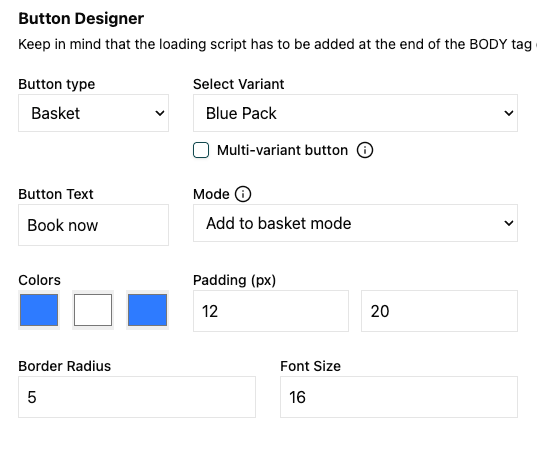
Pathway 1 - Embedded Widget (Existing Website): A code snippet that gets pasted into your current website's HTML. This is the fastest route if you already have a site on WordPress, Wix, Squarespace, or Shopify. The widget loads Pulso's booking interface without leaving your domain.
Pathway 2 - Native Website Builder Integration: Platforms like Wix and Squarespace now offer app marketplaces where Pulso can be installed with one click. This removes the need to touch any code. The booking functionality becomes a native block you drag into your page editor.
Pathway 3 - OTA Channel Distribution: Online Travel Agencies (OTAs) like GetYourGuide, Viator, or Outdoorsy act as third-party storefronts. You list your inventory on their platform, and they handle the transaction. Pulso syncs availability across these channels to prevent double-bookings.
Pathway 4 - Offline Booking Sync: Walk-ins and phone reservations still represent 40-60% of rental transactions. Pulso interface allows staff to log these bookings instantly, ensuring your online widget reflects real-time availability.
3. When should you use an embedded widget vs. native integration?
Use an embedded widget when you want full control over placement, styling, and page flow on an existing custom website. Use native integration when you prioritize speed and simplicity over design customization.
Embedded Widget Advantages:
- Works on any website platform, including custom-built sites
- Complete control over button placement, colors, and sizing
- Can be embedded in blog posts, landing pages, or service descriptions
- Requires basic copy-paste skills into HTML editor
Native Integration Advantages:
- Zero coding required
- Automatic updates pushed by platform provider
- Pre-designed templates optimized for mobile
- Easy interface for non-technical users
Pulso Use Case: If you run a photography rental shop with a custom WordPress site showcasing your gear in a portfolio format, you can embed the widget directly with 1 line of code and you can start receiving bookings. If you run a bike rental kiosk and need a website in 24 hours, you install Pulso and launch the same day.
If you're new to the business, you can use our website builder to create your full website along with the booking engine.
Is it better to rebuild a website or add a booking widget?
Integrating a booking engine is a targeted, surgical upgrade that is significantly faster, safer, and more cost-effective than a total website rebuild. Many owners fall into the trap of believing that to offer professional online booking, they must migrate their entire web presence to a new platform or hire a developer for a custom build. This is a common misconception that leads to "analysis paralysis" and delayed growth.
Preserve SEO Rankings: Your current website likely has history with search engines. Adding a widget allows you to keep your current domain and content, ensuring your Google rankings remain stable while adding transactional power.
Lower Technical Barrier: You do not need to be a developer to paste a code snippet. A widget is a "layer" of functionality that works on top of what you already have.
Cost Efficiency: A full rebuild can cost thousands and take months. A widget integration happens in minutes and costs a fraction of the price.
No-Code Options for New Starters: If you do not yet have a website, the most efficient path is using a modern "no-code" builder like Wix, Squarespace, or Framer and embedding the Pulso engine. This combination allows you to launch a high-performance rental site without expensive custom code.
4. How does a booking button capture more customers at the point of decision?

A booking button captures customers at their highest point of intent by providing 24/7 revenue generation and eliminating the friction of the "inquiry" phase. Consumer psychology has shifted; the modern renter—whether they are looking for a professional camera kit or a weekend motorcycle—values immediate certainty over personal interaction during the research phase.
The 10:00 PM Researcher: Most rental decisions are made after business hours. A widget processes orders while you are asleep, ensuring you don't lose the "late-night researcher" to a competitor who offers instant confirmation.
Instant Certainty: Instead of a "Request a Quote" form, which acts as a point of friction, customers get an immediate confirmation. This stops them from continuing their search on other tabs.
Customer Autonomy: Renters prefer to customize their own experience. A widget allows them to toggle between different bike sizes, add accessories like GPS or insurance, and see the price change dynamically.
Securing the Commitment: By requiring a deposit or full payment at the moment of booking, you secure the customer's commitment. This dramatically reduces "no-shows" compared to verbal or email reservations.
5. What is a "Single Source of Truth" in rental management?

A single source of truth is the absolute synchronization of your backend operations, where every sales channel—online, walk-in, and phone—reports to one centralized dashboard. In a fragmented system, your website might say you have three motos available, but your shop floor actually has zero because of unlogged walk-ins. This discrepancy is the root cause of operational stress.
Real-Time Inventory Locking: As soon as a customer clicks "Book" online, that specific asset or category is instantly removed from availability for your counter staff and other online visitors.
Elimination of "Buffer" Inventory: Many owners hold units back "just in case" of errors. With a single source of truth, you can rent 100% of your fleet with total confidence, maximizing your revenue potential.
Accurate Financial Reporting: Because every transaction is logged in the same system (Pulso), your revenue reports, deposit logs, and tax data are always accurate and ready for review.
6. How do OTA marketplaces work with your direct booking system?
OTA marketplaces (GetYourGuide, Viator, Airbnb Experiences, Outdoorsy) act as external sales channels that expose your inventory to travelers already searching for activities. Pulso functions as the "inventory control tower," syncing availability across all channels to prevent a tourist booking your last paddleboard on Viator while a local books it on your website.
Channel Manager Logic: When a booking is made on any platform—your website, an OTA, or in-person—Pulso immediately updates availability across all channels. This is called "channel management" and prevents overselling.
Commission vs. Direct Trade-Off: OTAs charge 15-30% commission but deliver high-intent traffic you didn't have to market for. Your direct website has zero commission but requires SEO and advertising investment. The optimal strategy is operating both channels simultaneously with unified inventory.
Example Scenario: A construction equipment rental company lists their scissor lifts on both their website and Outdoorsy. A contractor books a lift for March 15-20 via the website at 9:00 AM. At 9:01 AM, an Outdoorsy user searching for the same dates will see "unavailable", because you have already locked the inventory.
6. Why is offline booking sync the most overlooked technical requirement?
Offline booking sync ensures that walk-in customers and phone reservations are instantly reflected in your online availability, preventing the catastrophic scenario where your counter staff accidentally rents equipment that was just booked online seconds earlier. Most rental owners underestimate the volume of "analog" transactions and fail to connect these to their digital systems.
The Counter Blindness Problem: Your staff member is helping a customer at the counter and manually writes down a reservation for a mountain bike on Saturday. If this transaction isn't logged in Pulso within 60 seconds, your website widget will still show that bike as available, leading to a double-booking.
Mobile App for Counter Staff: Pulso provides a mobile interface that allows counter staff to create bookings, process walk-ins, and mark returns using a tablet or smartphone. These actions sync to the cloud instantly, updating your website widget in real-time.
Phone Booking Workflow: When a customer calls to reserve a camera, your staff opens the Pulso dashboard, checks live availability, creates the booking, and processes payment—all while on the phone. The customer receives an automated confirmation email before the call ends.
Eliminating the "Temporary Hold" Trap: Many shops place verbal "holds" that never get converted to confirmed bookings. Pulso forces a decision point: the unit is either booked (with payment) or remains available. This eliminates the gray area where equipment sits in limbo.
7. Why is peak season the ultimate test of your booking engine?
Peak season is when the hidden costs of manual management become visible, as high-volume "administrative noise" begins to interfere with physical shop operations. When your shop is full of customers, the last thing your staff should be doing is answering the phone to explain pricing or checking a calendar for future availability.
Automated Throughput: A widget allows you to process more rentals per day because the administrative work (data entry, payment, contract signing) is done by the customer before they arrive.
Pre-Arrival Compliance: Digital waivers and contracts are signed during the online checkout flow. This means that during your busiest hours, your counter staff are simply verifying IDs and handing over keys.
Filter for Serious Renters: During peak times, your time is your most valuable asset. Automated booking filters out "tire-kickers" and ensures that your energy is spent on confirmed, paying customers.
8. How does Pulso solve the technical and operational gap?
Pulso acts as the technical bridge between your existing website and your physical inventory through a "plug-and-play" widget that requires no specialized coding knowledge. We understand that rental owners are experts in their gear, not in web development. Our engine is designed to be embedded in minutes, providing a premium checkout experience that rivals major global brands.
Live Backend Sync: Our widget queries your live Pulso database to ensure the asset is ready, cleaned, and not currently flagged for maintenance.
Integrated Payment Processing: Via Stripe integration, you can handle pre-authorizations, security deposits, and final payments securely without manual card entry.
Custom Brand Styling: You maintain full control over the aesthetic. The widget should look like a native part of your brand, ensuring a seamless journey from your homepage to the confirmation screen.
Automated After-Care: Pulso handles the heavy lifting after the click—sending automated confirmation emails, return reminders via SMS, and digital waivers.
Multi-Channel Architecture: Whether a booking comes from your website widget, your counter tablet, a phone call logged in the mobile app, or an OTA partner, every transaction flows into the same centralized system. This eliminates data silos and ensures your financial reporting is always accurate.
9. Strategic Thinking: Asset Optimization vs. Task Management
The most successful rental businesses stop thinking about "managing tasks" and start thinking about "optimizing assets" to maximize daily revenue. A task-based mindset asks: "Did I write down that reservation?" An optimization mindset asks: "How can I ensure this asset is earning revenue for 95% of the month with zero manual intervention?"
Dynamic Pricing Logic: Use the data from your Pulso dashboard to adjust rates. You can lower rates on quiet Tuesdays via the widget or increase them for holiday weekends to maximize margins.
Maintenance Scheduling: The system blocks out time for repairs automatically. This ensures you never accidentally rent a bike that has a known mechanical issue, protecting both the customer and your equipment.
Fleet Planning: Identify which gear is constantly booked and which sits idle. This allows you to make smarter inventory investments for the following season.
10. Summary FAQ for Rental Booking Widgets
Do I need a developer to install the Pulso booking button?
No. Pulso provides a small snippet of code that you can copy and paste into your website's editor (Wix, WordPress, Squarespace, Shopify). It functions as a lightweight script that won't slow down your site. For Wix and Squarespace users, we also offer one-click native installation from their app marketplaces.
How does the system handle equipment maintenance?
When an item is marked as "In Maintenance" within the Pulso dashboard, it is automatically removed from the online availability.
What if I don't have a website yet?
It's best to use Pulso Website Builder which is included in your plan and we can help you refine your website. You create the logic and the skeleton and we can always help you get expert onboarding or discuss your customization. It's a fully functional digital storefront with a booking engine integration so that you don't think about many tools at once.
You can also use a no-code builder like Squarespace or Wix. They are affordable and easy to manage and allow customization as it comes to the digital storefront. You simply build your pages and embed the Pulso widget to handle the transactional side. Most rental owners launch within 48 hours using this approach.
Can I set different prices for weekends or peak seasons?
Yes. Pulso supports dynamic pricing rules. The widget will automatically apply surcharges or discounts based on the dates selected by the customer. You can also create custom pricing.
What happens if a customer cancels an online booking?
When a cancellation is processed in Pulso, the asset is instantly returned to the "available" pool on your website widget and your booking system, ensuring you don't lose revenue on a last-minute opening.
How do I track which channel generates the most bookings?
Pulso's reporting dashboard shows all bookings so that you can achieve higher revenue.
11.Conclusion
The gap between a lead and a customer is often a single phone call that never happens. In a market where convenience is the primary currency, your website must be more than a digital brochure—it must be a transactional engine. By providing a direct, 24/7 path to reservation across multiple channels while maintaining a single source of truth for offline operations, you ensure your business is as accessible as your customers' devices and as reliable as the gear you rent.
Start your 14-day free trial with Pulso today to consolidate your inventory, eliminate double-bookings, and open your shop to the world of automated, 24/7 rentals across all sales channels.

 Ivan Stoilov